

Raster Images and Pixel Grids come part in parcel, with pixel grids being involved in the making of raster images. The quality of the picture can be determined by this too, the quality getting degraded by this if zoomed into. You can see the blurriness and pixels when the image is zoomed into and you can see the pixel grid too.
The resolution of the image can be made better if there is a higher dpi on the file, as the resolution is measured in dpi. Though, with this the higher the dpi the bigger the file will be and you must be mindful to check if the device you’re using can handle the resolution and dpi you’re pumping out.
The Raster images are very hard to scale, up as the quality of them can go down every time it’s scaled. But, they are easily scaled down, the image becoming less sharp and more soft when done. Some common file formats for raster images – TIFF, JPEG, GIF, PCX and BMP.
Vector files tend to look more crisper when zoomed into and have a slick clean cut, with no pixels showing. Vector based images are based upon mathematical formulas derived from geometric primitives like polygons, lines, curves, circles and rectangles.
Line art graphics are best used with vector graphics, as it has flat uniform colours. Vector images are also not based upon resolution, so the quality would not dip. The quality of vector images vary upon whatever device is being used to display them can handle – when rendering them.
Like with a printer as well the quality would not change, unlike with raster images, where the quality can shift when it is printed out. Some common formats for vector files – AI, EPS, SVG, and PDF
XY and Z coordinate systems show how our image is displayed to us. In a 3D sense, the image/things in the image would be displayed to us in a 3 dimensional plane. We would be able to see the front, back middle and sides of the object in question by scrolling around it with the XY and Z coordinate system.
To understand Anti-alias of an image we must first grasp what aliasing of an image is, this is when the quality of the image (Resolution) is too low. This causes a “stair-stepping” effect on the images edges, making it look less smooth and more crooked. Anti-Aliasing is when these edges are smoothed out by having the colours of the image averaged at a boundary.
Aspect ratio refers to the width to height of the image or screen displaying the image.

Raster images and pixel grids


Bit Depth


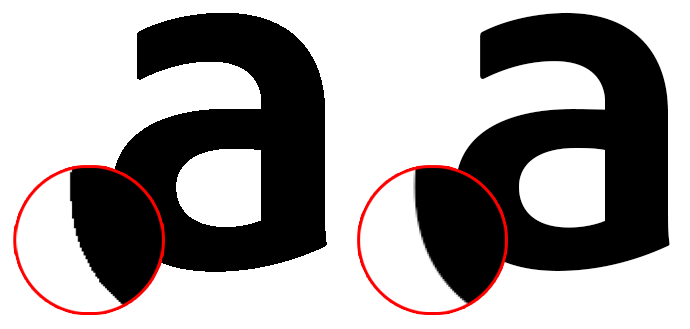
Anti-Alias

 Heather Barbeau's Blog